别只盯着卡路里估算。看心率区间、训练状态和持续时间,更容易判断这次游泳有没有真的进入有效状态。
让每个一千米的进步都清晰可见
配速、心率、划频、划距和长期里程都在记录你的变化。一千米把授权游泳数据重新组织起来,让你看见自己怎么一点点变稳、变快、变有效率。
你可以用它解决什么问题
进步不是每天都能感觉到。把配速、心率和 DPS 放到时间线上,才会发现自己什么时候波动、什么时候稳定、什么时候突破。
把今年的一千米和去年的一千米放在一起。5 分钟不再只是一个数字,它会变成同一个泳池里的距离差。
进步不是一条均线。
很多变化发生在你没注意的时候:动作调整,心率上来;身体适应,状态变稳;再次突破,然后进入下一轮循环。
对应怎么用
想知道自己到底哪里进步了
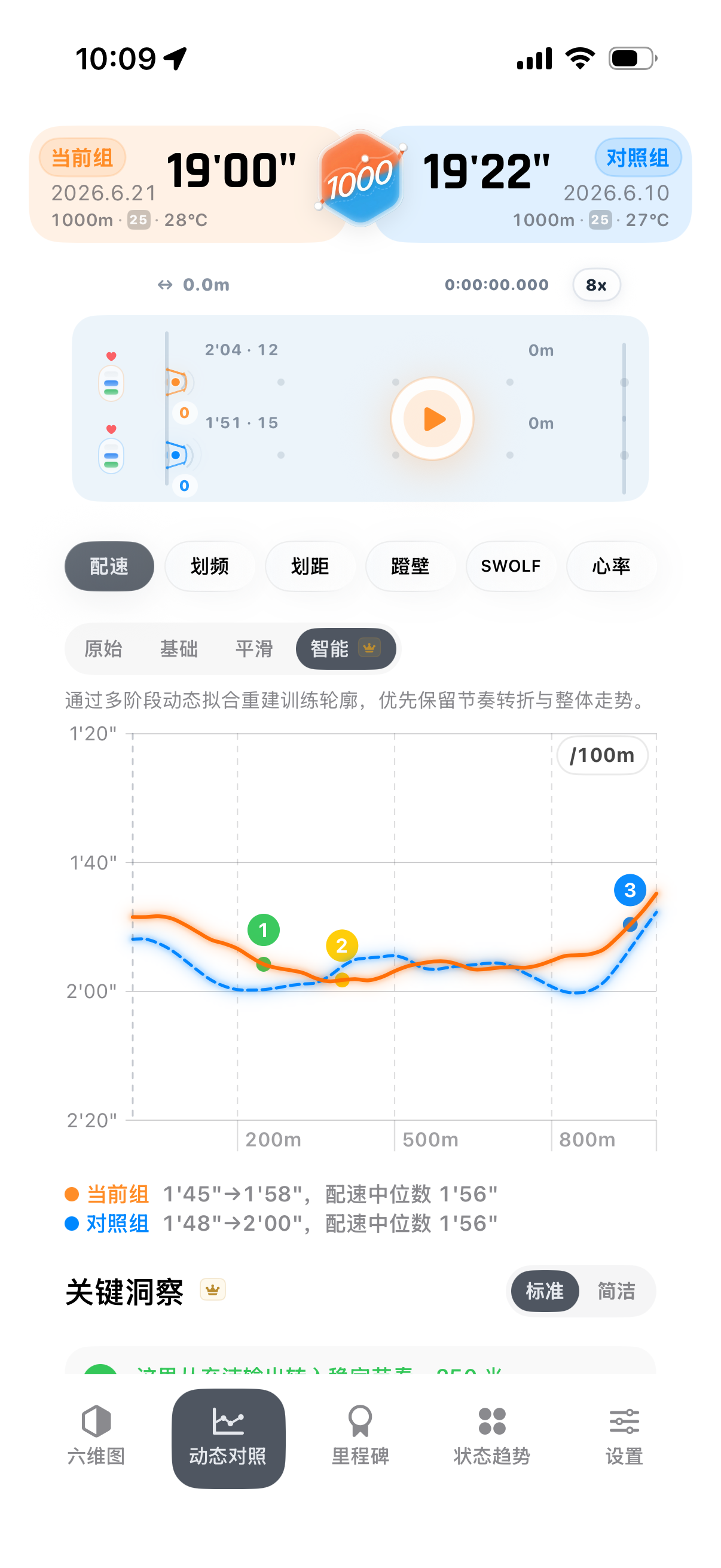
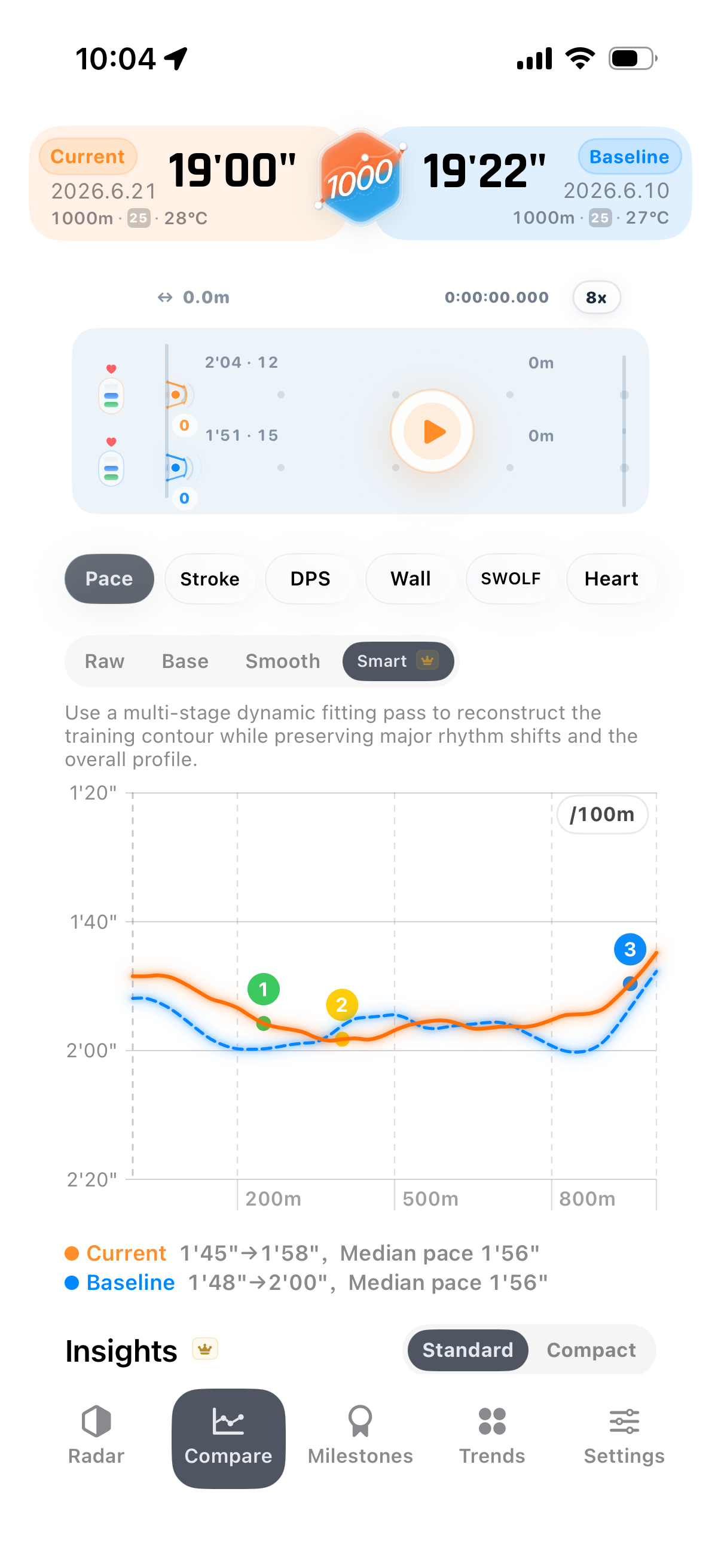
打开动态对比,选择两次相近距离的游泳。它会把配速、距离差和同池位置放在一起,而不是只告诉你快了几分钟。
- 点哪里:进入一次游泳记录,选择动态对比,再选一场历史游泳。
- 看什么:同池模拟看领先距离,折线看哪一段节奏拉开差距。
- 解决什么:把“我变快了”变成“我在这里变强了”。
长期训练,想看出阶段变化
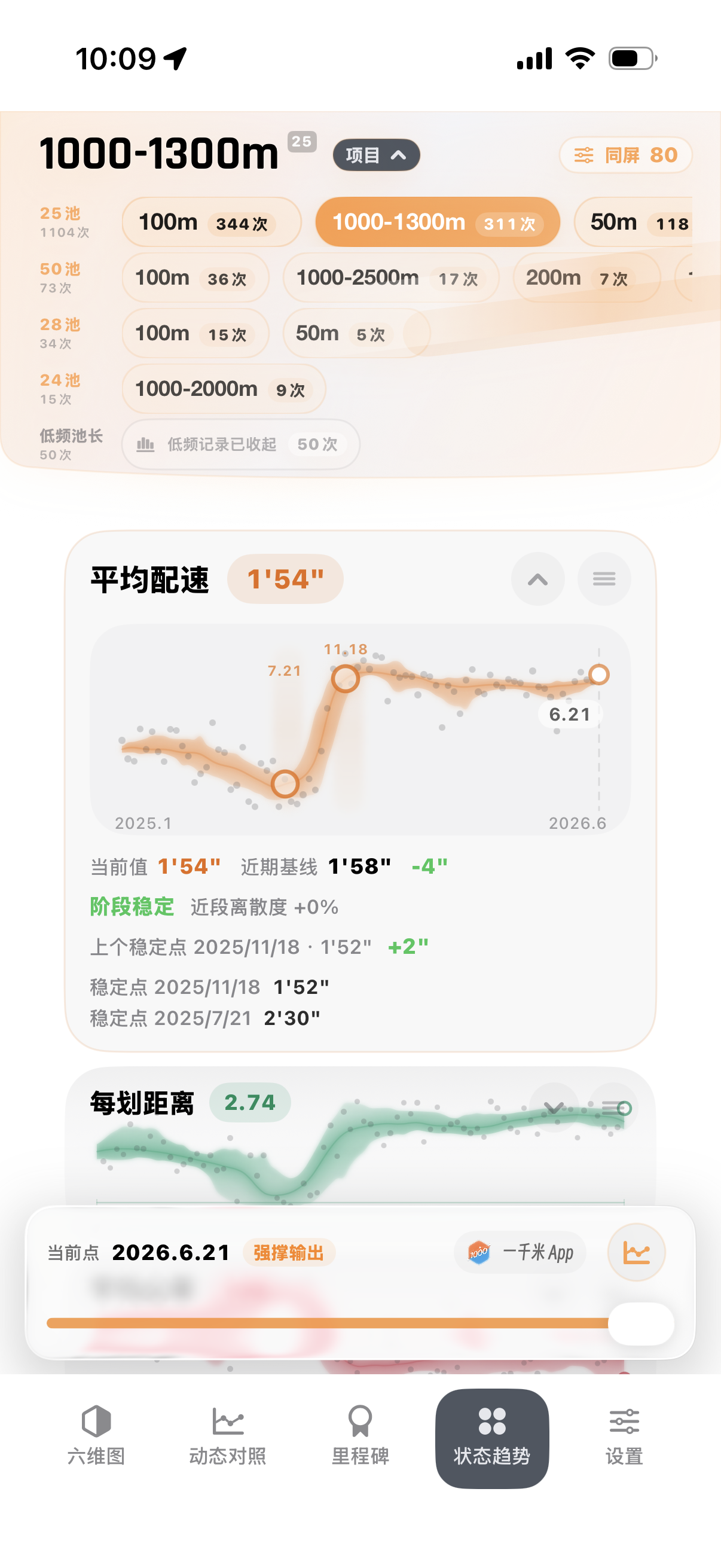
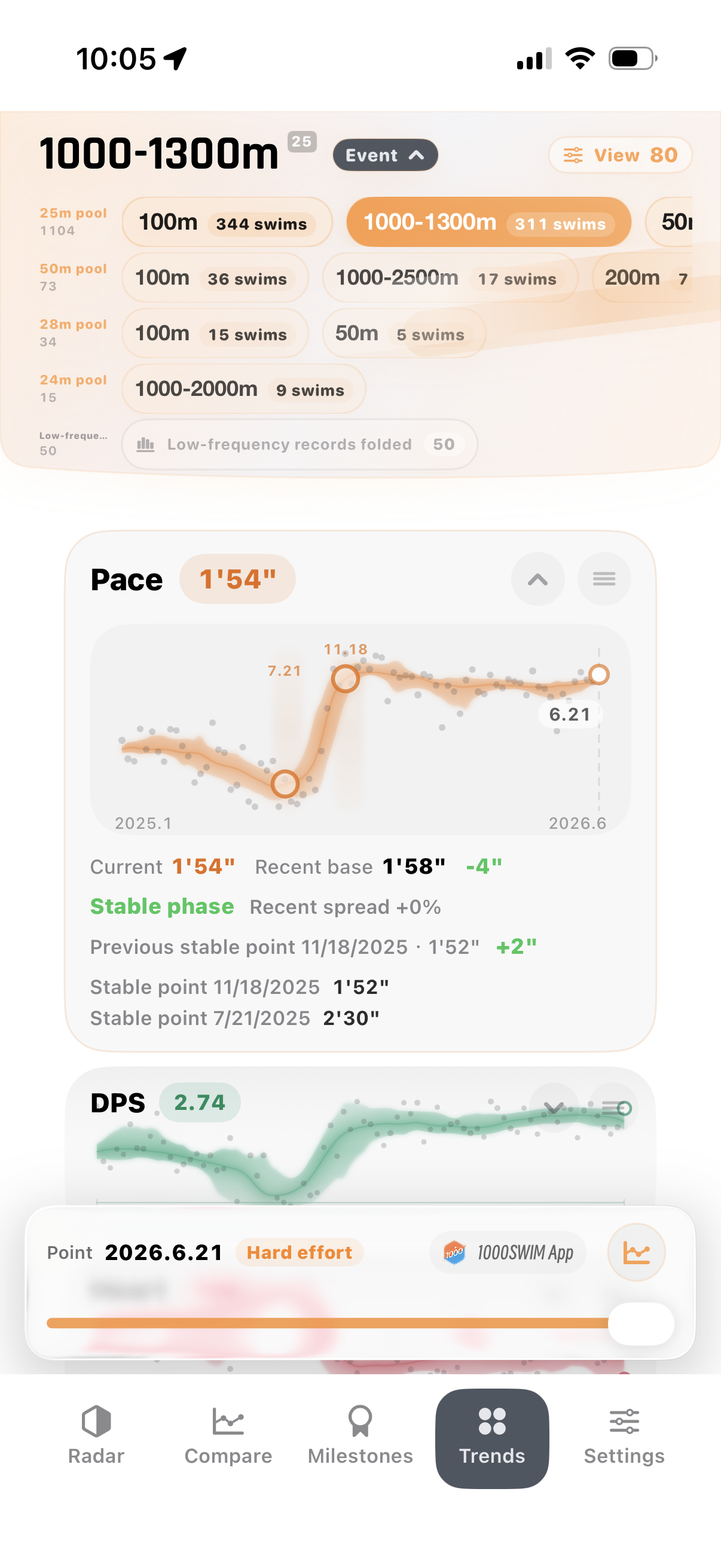
打开状态趋势,把配速、心率、DPS 放到时间线上。动作调整、适应期、平台期和再次突破会更容易被看见。
- 点哪里:进入详情页,切到状态趋势。
- 看什么:配速是否变稳,心率是否回落,DPS 是否在提高。
- 解决什么:知道自己不是没变化,只是进步发生在阶段里。
想知道这次训练强在哪里
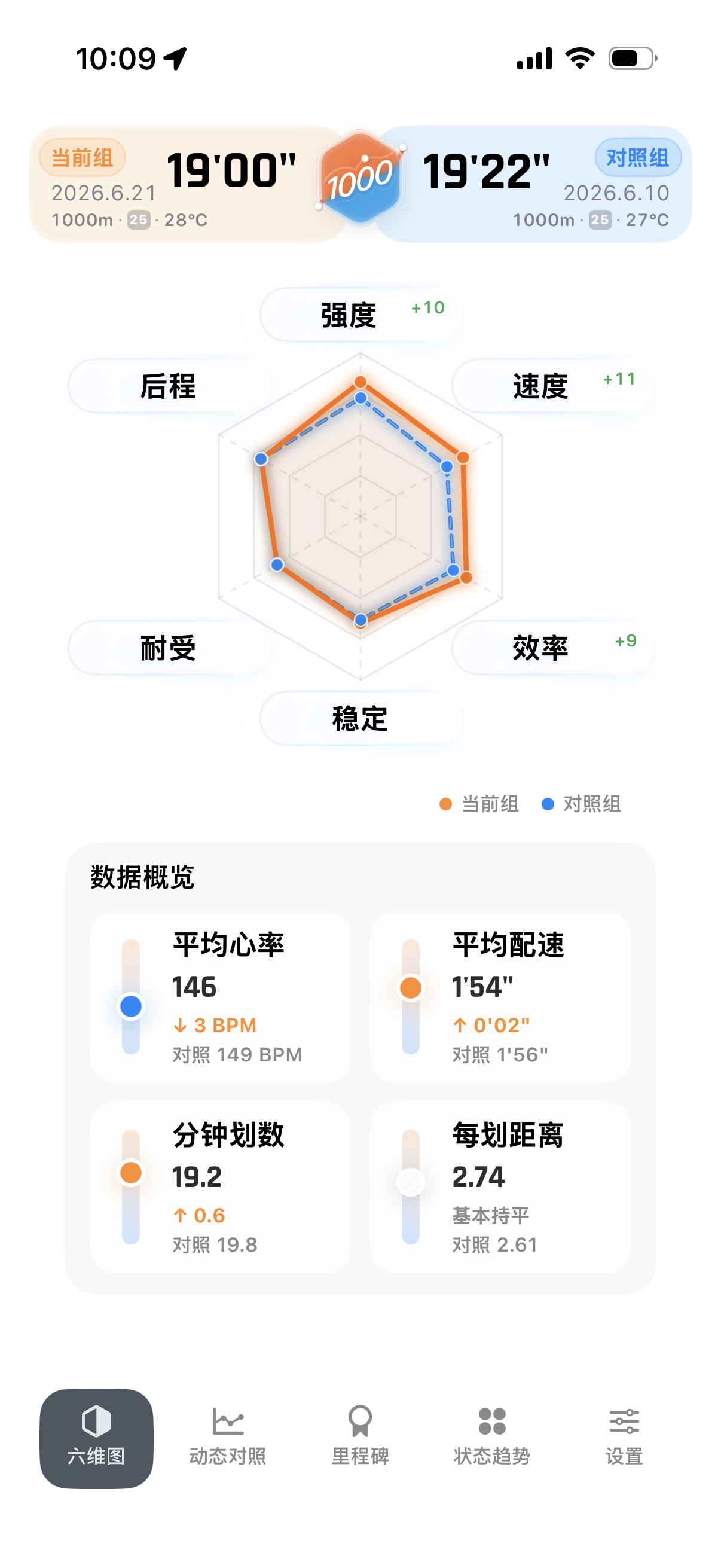
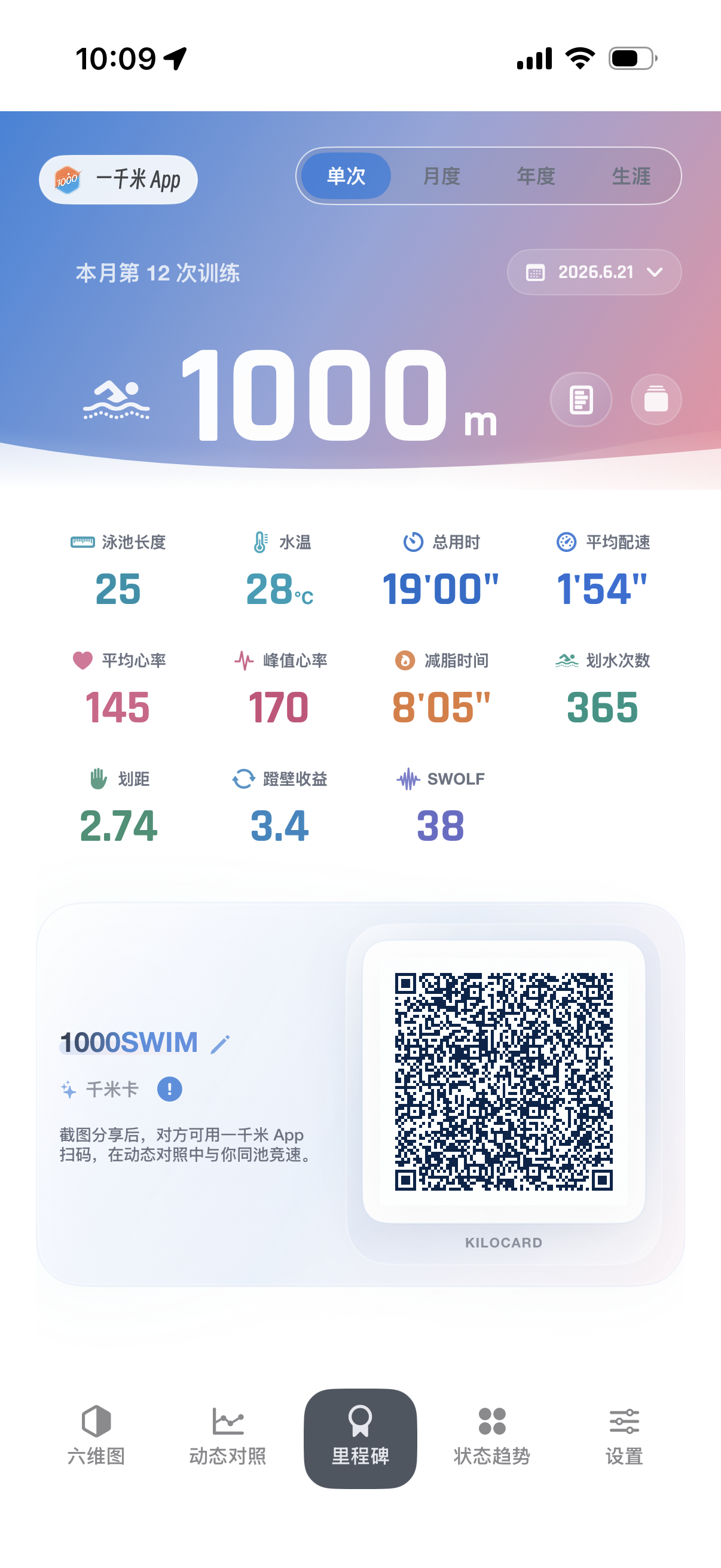
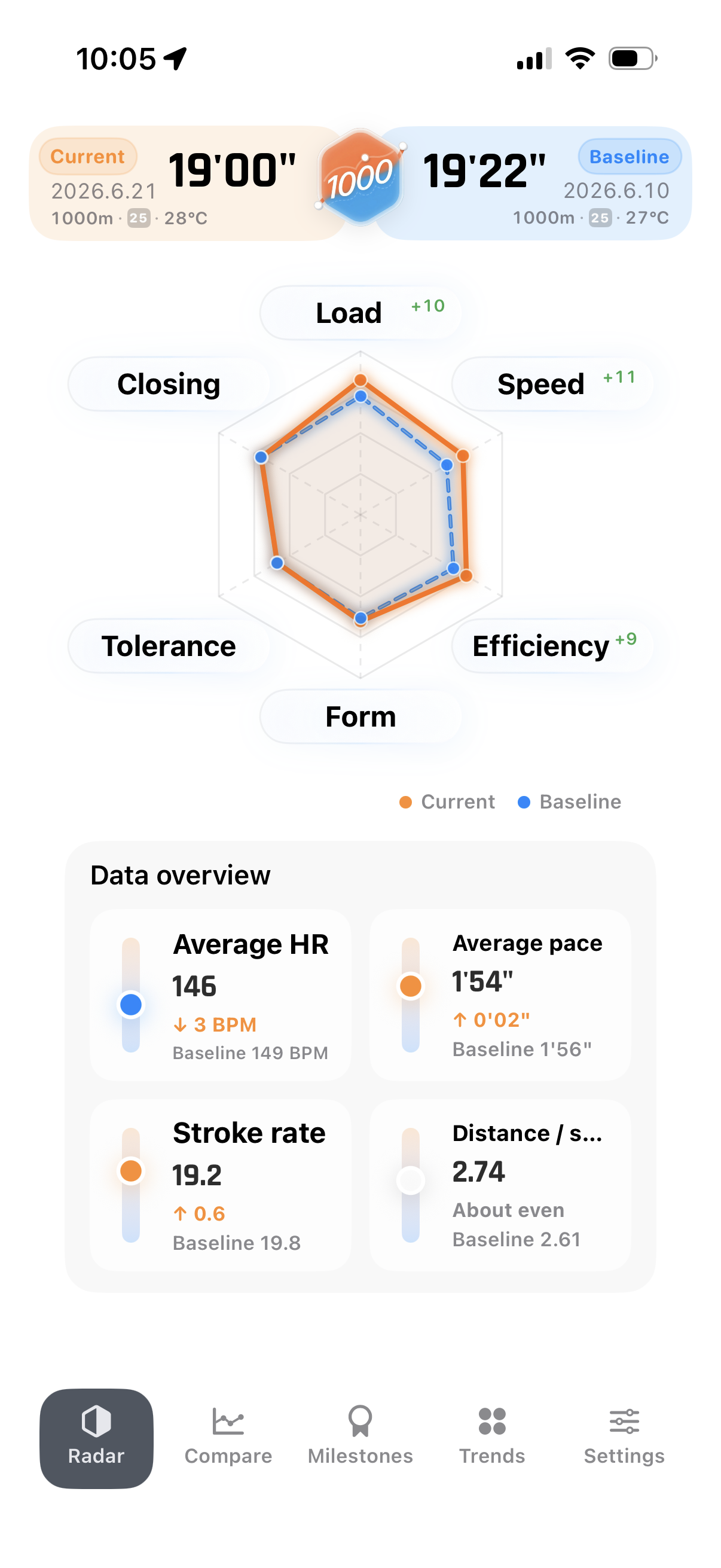
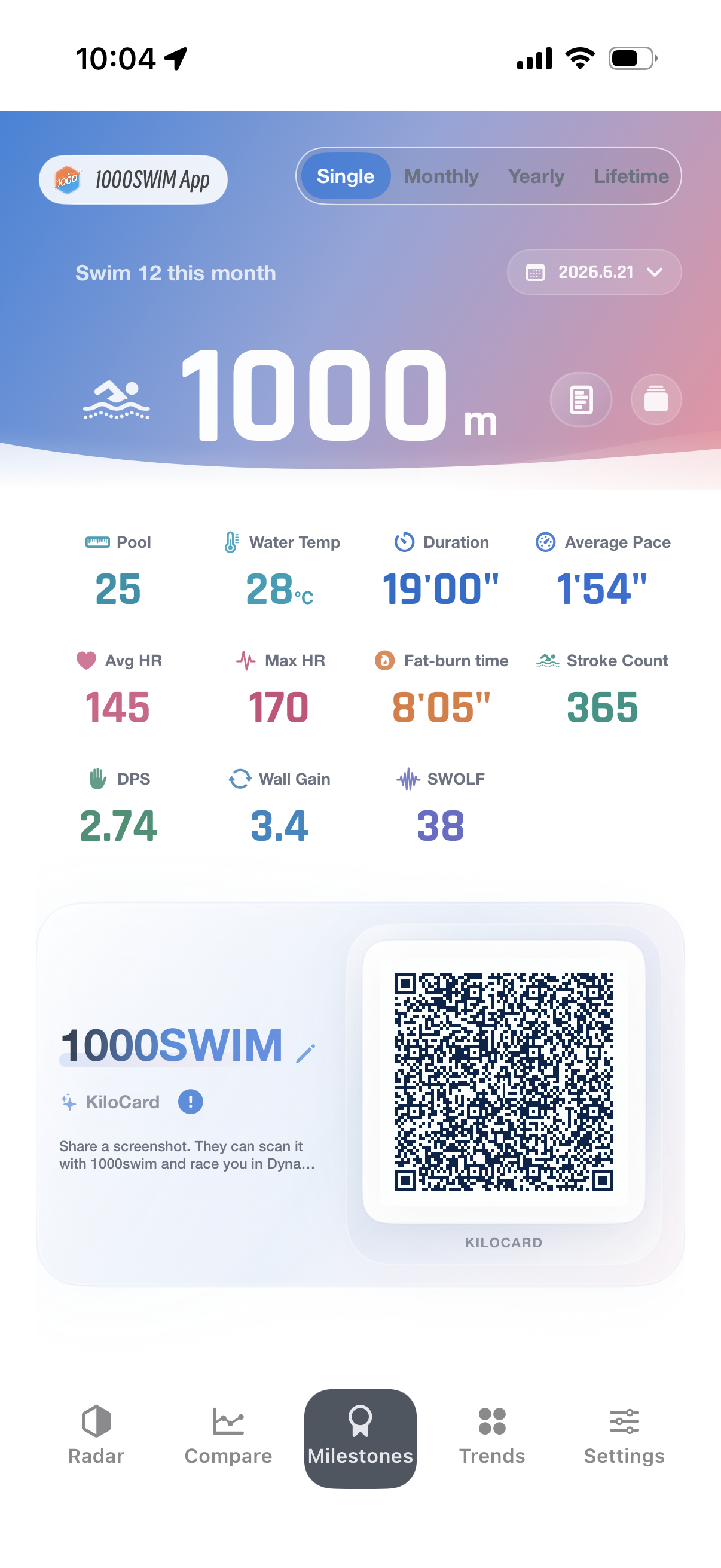
看六维图和千米卡。六维图把速度、效率、负荷和动作表现归纳到一屏,千米卡则把一次训练变成可以分享和对照的记录。
- 点哪里:切到六维图查看结构,再用 KiloCard 生成分享卡。
- 看什么:速度是不是靠效率提升,而不是单纯更拼;卡片能不能作为好友对照。
- 解决什么:让一次训练有结构,也有分享价值。
想让坚持本身更有成就感
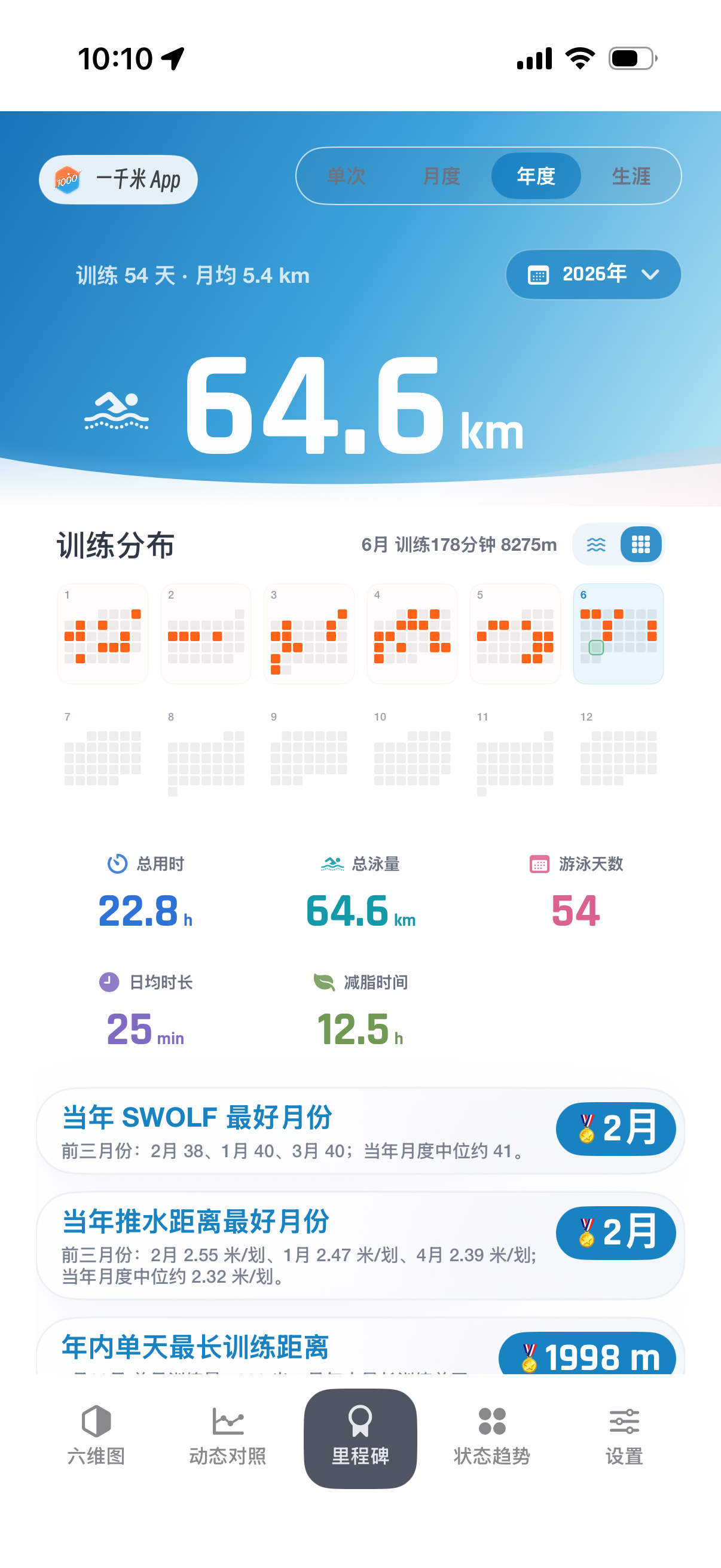
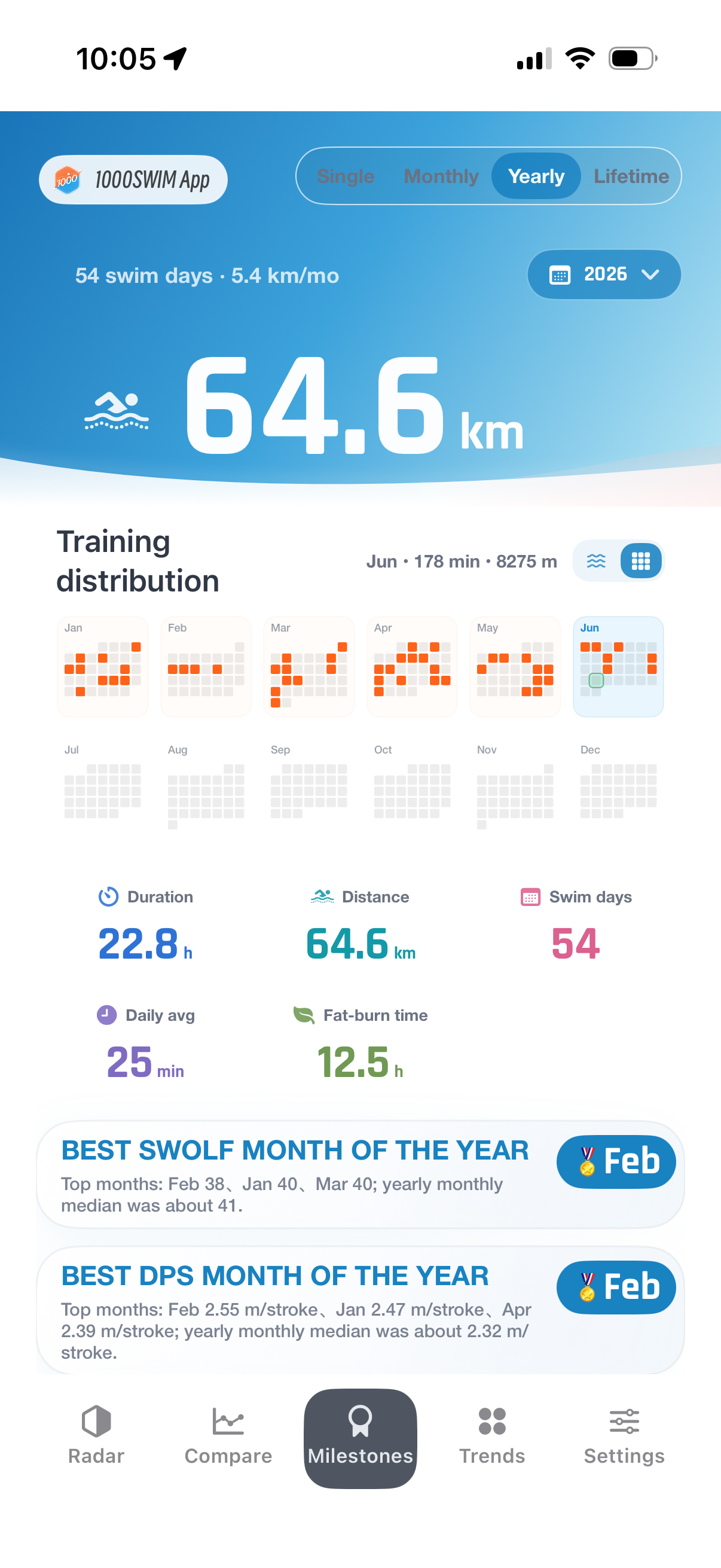
看里程碑。每天一千米看起来普通,但月度、年度和生涯累计会把长期坚持变成很具体的节点。
- 点哪里:打开里程碑,看月度、年度和生涯进度。
- 看什么:今年游了多少、哪个月最稳定、下一段距离还差多少。
- 解决什么:让重复训练不只是重复,而是持续积累。
数据来源与限制
一千米读取 Apple 健康中用户授权开放的游泳训练数据,并基于这些数据进行本地分析。Apple Watch 记录越完整,动态对比、划频、划距、SWOLF 和状态趋势越能发挥作用。
如果第三方设备没有把泳池长度、划水次数、心率或分段数据完整同步到 Apple 健康,部分分析可能只能提供有限参考。这是源数据字段限制,不代表原始训练记录丢失。
隐私与本地处理
训练分析以本地处理为主。KiloCard 仅包含用于动态对照的粗略训练信息,不等同于完整 HealthKit 明细。你也可以随时通过系统授权控制应用对健康数据的访问。
适合规律长游、1000 米训练复盘、阶段对比和希望看清自己变化的游泳用户。
Make every 1000 m of progress clear
Pace, heart rate, stroke rate, DPS, and long-term distance are quietly recording how you change. 1000swim reorganizes authorized swim data so you can see where you became steadier, faster, and more efficient.
What it helps with
Do not over-focus on calorie estimates. Heart-rate zones, workout state, and steady duration are easier signals to act on.
Progress is not always obvious day to day. Put pace, heart rate, and DPS on a timeline, and the stages start to show.
Put this year's 1000 m next to last year's. A 5-minute gap stops being abstract when it becomes distance in the same pool.
Progress is not a straight line.
Stroke changes raise the load. The body adapts. The swim gets steadier. Then the next breakthrough starts another cycle.
How to use it
Find where you actually improved
Open Dynamic Compare and select two similar-distance swims. It puts pace, distance gap, and same-pool position together instead of only showing a finish-time difference.
- Where to tap: Open a swim, choose Dynamic Compare, then pick a past swim.
- What to read: Use same-pool simulation for distance gap, and line charts for where the pace separated.
- What it solves: Turns "I got faster" into "this is where I got stronger".
See long-term training stages
Open Status Trends and put pace, heart rate, and DPS on a timeline. Stroke changes, adaptation, plateaus, and breakthroughs become easier to spot.
- Where to tap: Open the detail page and switch to Status Trends.
- What to read: Look for steadier pace, lower heart rate, or rising DPS.
- What it solves: Shows that progress may be happening in stages, not every single day.
Understand what was strong in this swim
Use Radar and KiloCard. Radar summarizes speed, efficiency, load, and stroke behavior in one view. KiloCard turns one swim into a shareable comparison reference.
- Where to tap: Switch to Radar, then create a KiloCard from the swim.
- What to read: See whether speed came from better efficiency, not just harder effort.
- What it solves: Gives one workout both structure and share value.
Make consistency feel rewarding
Use Milestones. A daily 1000 m swim may feel ordinary, but monthly, yearly, and lifetime views turn repetition into visible accumulation.
- Where to tap: Open Milestones and review monthly, yearly, and lifetime progress.
- What to read: Check yearly distance, stable months, and the next progress point.
- What it solves: Makes routine training feel like it is building toward something.
Data sources and limitations
1000swim reads swim workout data from Apple Health after the user grants permission, then analyzes it locally. The more complete the Apple Watch record is, the more useful Dynamic Compare, stroke rate, DPS, SWOLF, and Status Trends can be.
If a third-party device does not sync pool length, stroke count, heart rate, or split data into Apple Health, some analysis may only be available as limited reference. This is a source-data limitation, not a sign that the original workout disappeared.
Privacy and local processing
Workout analysis is primarily processed on device. A KiloCard contains rough training data for dynamic comparison and is not equivalent to complete HealthKit details. You can control Health data access through system permission settings.
Built for regular long swims, 1000 m reviews, phase comparisons, and swimmers who want to understand their own changes.